


.svg)
.png)




Share this
by Charlie Treadwell on Feb 27, 2026, 4:31:49 PM
Every firewall administrator I talk to has the same story. Not the headline-grabbing breach stories. The quiet, grinding one about maintaining Dynamic Address Groups across dozens of Palo Alto Networks firewalls, manually updating IP-to-group mappings, and hoping nothing breaks between the last change window and the next audit. It's a Palo Alto firewall automation problem hiding in plain sight.
Here's the thing: Palo Alto Networks builds excellent firewalls. The NGFW platform, Panorama, the security profiles, App-ID, the whole stack is genuinely capable. The problem isn't the firewall. The problem is what we're asking firewall admins to do with their time. Specifically, we're asking them to be the human API between device discovery and policy enforcement, and that doesn't scale.
In this post, I'll walk through exactly why manual DAG management becomes the hidden tax on every enterprise PAN deployment, why IP-based address groups fail for unmanaged devices, and the specific workflow that identity-based automation uses to eliminate the problem without replacing your firewall investment.
By the Numbers: Firewall Rule Bloat at Enterprise Scale
- 70-80% of firewall rules in large enterprises are outdated, redundant, or no longer serving their original purpose, based on firewall optimization vendor data (Tufin/FireMon)
- 89% of major incidents involved identity weaknesses enabling privilege escalation and lateral movement (Unit 42, 2026 Global Incident Response Report)
- 75% reduction in firewall management overhead reported by organizations automating DAG population with identity-based classification (Elisity ROI Case Study Data)
- 29 minutes: average eCrime breakout time from initial compromise to lateral movement (CrowdStrike, 2025 Global Threat Report)
The Real Cost of Manual DAG Management: Where Palo Alto Firewall Automation Breaks Down
Let me break this down with a scenario most firewall admins will recognize. You have 40 Palo Alto Networks firewalls across 15 sites. Each firewall uses Dynamic Address Groups to enforce security policies: one DAG for medical imaging devices, another for building automation controllers, another for corporate laptops, and so on. Maybe you've got 30 to 50 DAGs per firewall.
Now a new infusion pump model gets deployed across three hospitals. Or a batch of IoT sensors shows up on the manufacturing floor. Or someone plugs a personal laptop into an open Ethernet port in a conference room.
What happens next? Someone (you) has to figure out what that device is, which DAG it belongs in, and update the mapping. Multiply that by hundreds of devices per month across all your sites, and you start to see the problem. This isn't security architecture. It's data entry. And the moment you fall behind, you've got devices sitting in overly permissive groups, or worse, in no group at all.
The industry data confirms what practitioners already feel: 70-80% of firewall rules in large enterprises are outdated or redundant. That number doesn't happen because firewall admins are careless. It happens because the manual process of maintaining address groups and rules can't keep pace with the rate of change on the network.
Why IP-Based Address Groups Fail for IoT, OT, and IoMT
Traditional firewall address groups work on a basic premise: an IP address maps to a device, and that device belongs in a specific group. For managed endpoints running Active Directory with static IPs, that model works reasonably well. But the network has changed.
In practice, the devices that represent the highest risk are often the ones that IP-based grouping handles worst:
- IoT devices often use DHCP, meaning their IP address changes. Your DAG mapping from last week? Stale.
- OT systems (PLCs, HMIs, RTUs) are rarely in any IT management system. No Active Directory. No endpoint agent. No CMDB entry, unless someone manually added one.
- IoMT devices (infusion pumps, patient monitors, imaging systems) rotate through departments, get swapped for service, and reappear with new IPs. Hospitals often have thousands of these.
- Shadow IT and unauthorized devices show up on your network without any classification at all. They sit outside every DAG until someone notices them, if someone notices them.
The result is a policy enforcement gap. Your firewall rules might look thorough in Panorama, but the actual enforcement on the wire has holes wherever devices haven't been correctly classified and mapped. This is the gap attackers exploit for lateral movement, and with an average eCrime breakout time of 29 minutes (CrowdStrike, 2025 Global Threat Report), you don't have long before initial access becomes full network traversal.
The Shift: Identity-Driven Classification Feeding Your Firewall
The core insight behind automating Palo Alto Networks firewall policy management is straightforward: instead of asking humans to maintain the mapping between devices and address groups, let an identity-based system do it continuously.
This isn't about replacing your PAN firewalls. It's about feeding them better data, faster, without manual intervention. Your firewalls still enforce the policies. Your team still writes the security rules between DAGs. The difference is that the DAGs themselves are populated automatically based on verified device identity rather than manual IP tracking.
Here's how that works in practice, broken into three steps.
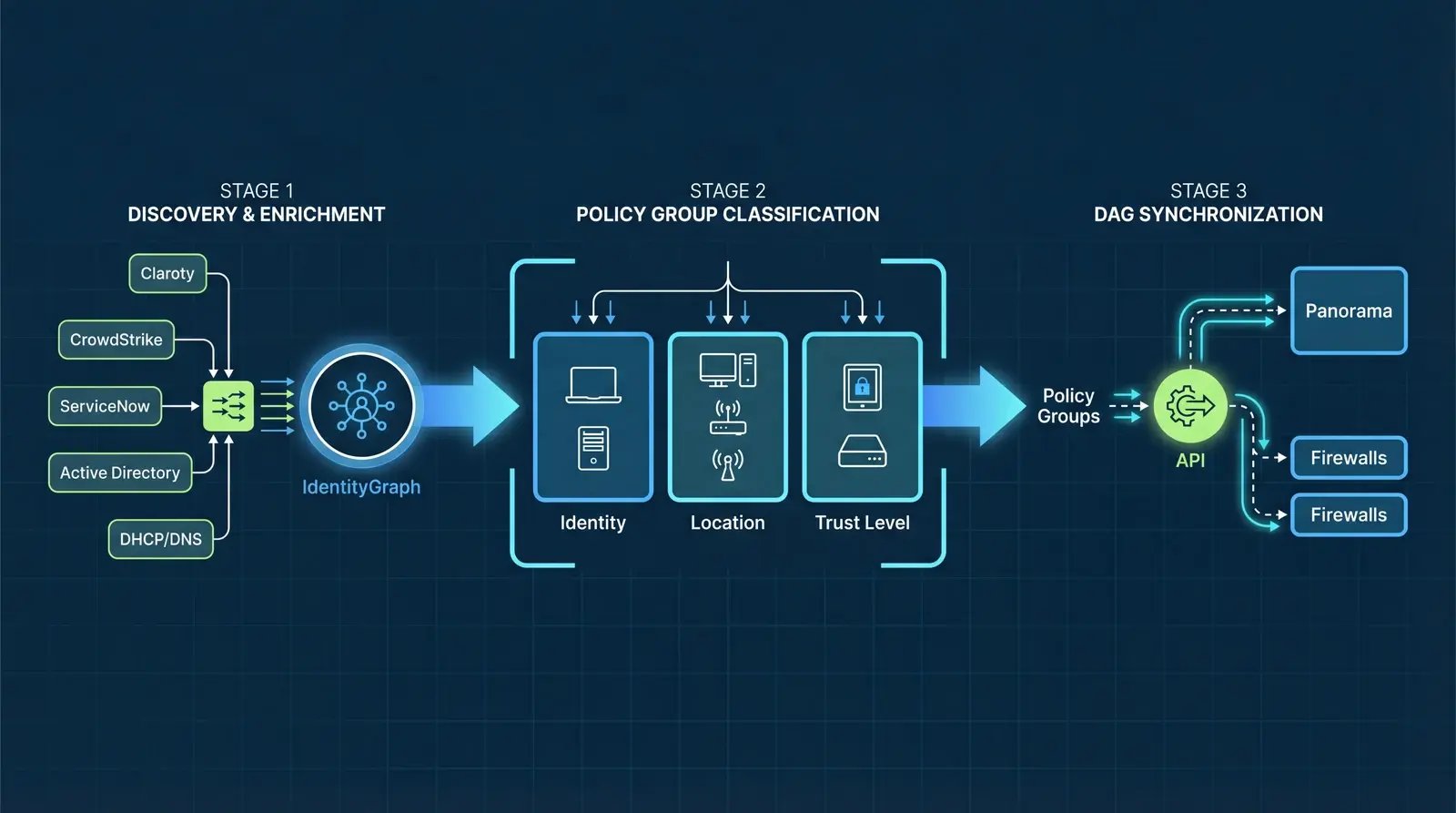
Step 1: Discovery and Enrichment via IdentityGraph
The process starts at the network edge, at the switch port. When a device connects to the network, it's discovered using the existing network infrastructure. No agents. No SPAN ports. No dedicated sensors. The point of connection itself becomes the discovery point.
But discovery alone isn't enough. A MAC address and an IP tell you almost nothing about what a device actually is or what it should be allowed to do. That's where multi-source enrichment matters.
The IdentityGraph aggregates identity attributes from multiple trusted sources to build a composite identity for every device:
- OT security platforms like Claroty xDome, Armis, and Nozomi Networks provide deep device classification for industrial and medical devices
- EDR/XDR platforms like CrowdStrike Falcon provide managed endpoint posture, compliance state, and threat intelligence
- IT service management systems like ServiceNow provide CMDB records, ownership data, and lifecycle status
- Identity providers like Active Directory provide user-to-device relationships and group memberships
- Custom databases and regional asset spreadsheets that many organizations maintain alongside their primary CMDB
The result is a continuously updated identity record for every device on the network, managed and unmanaged alike. This is the foundation that makes automated DAG population possible. Without multi-source enrichment, you're just automating guesswork.
Step 2: Policy Group Classification
Once devices have rich identity records, they're classified into Policy Groups based on three categories of attributes:
Identity Attributes: What is this device? Device type, manufacturer, model, operating system, firmware version. An Alaris infusion pump gets classified differently than a Cisco IP phone or a Siemens PLC.
Location Attributes: Where is this device? Which site, which floor, which network segment, which proximity zone. A medical imaging device in the radiology department has different policy requirements than the same model in a mobile trailer in the parking lot.
Trust Attributes: How confident are we in this device's identity? Is it known in CrowdStrike? Verified in Active Directory? Recognized by Claroty? Manually approved? Trust Attributes represent the degree to which multiple external systems of record agree that this device is what it claims to be.
Policy Groups are dynamic. If a device's attributes change (it moves to a new location, fails a compliance check, or appears in a new identity source), its Policy Group assignment updates automatically. No ticket. No change window. No manual reclassification.
Step 3: DAG Synchronization to Palo Alto Networks Firewalls
This is where the automation connects to your existing PAN investment. Policy Groups are selectively mapped to Dynamic Address Groups and pushed to your Palo Alto Networks environment via API.
The workflow is specific:
- Administrators select which Policy Groups should be published as DAGs
- The mapping is configured in the management console (either to Panorama or directly to individual firewalls)
- Classified device IPs and their associated tags are pushed to PAN via the DAG API
- DAGs are continuously updated as devices are discovered, reclassified, or removed from the network
- Firewall administrators write security policies between DAGs using the same Panorama or firewall management workflows they already know
The critical point: this is additive. Your existing firewall rules, security profiles, and Panorama device groups remain exactly as they are. The automated DAGs supplement what you've already built. You're not migrating policies or re-architecting your firewall deployment. You're eliminating the manual data entry that keeps those policies from being accurate.
Why One Data Source Isn't Enough
I hear this question often: "We already have Palo Alto Networks IoT Security (or Claroty, or Armis) for device visibility. Why do we need multi-source enrichment?"
To be fair, each of these platforms is excellent at what it does. PAN IoT Security provides strong device classification for assets visible to your firewalls. Claroty goes deep on OT/ICS protocol analysis. Armis covers the full spectrum of connected devices. CrowdStrike knows everything about its managed endpoints.
The problem is that no single source sees everything. PAN IoT Security classifies devices that traverse your firewalls, but it won't see the building automation controller that communicates only on a local VLAN behind a Layer 2 switch. Claroty excels at OT device classification, but it doesn't know whether that same device is also a managed endpoint in CrowdStrike. Active Directory can tell you about domain-joined devices, but it knows nothing about the IoT devices that outnumber your laptops three to one.
Multi-source enrichment isn't about redundancy for its own sake. It's about building a composite identity where each source contributes what it knows best. When four independent systems agree that a device is an authorized Philips patient monitor running firmware version 4.2 in the ICU, your confidence in that classification (and the DAG it gets placed in) is materially higher than if you're relying on a single source.
Panorama vs. Direct Firewall Integration: When to Use Each
This is a practical question that comes up in every deployment conversation, and the honest answer is: it depends on your architecture.
Panorama integration is the right choice when you're managing multiple firewalls centrally and want DAGs to propagate consistently across your environment. Push Policy Groups to Panorama, and they cascade to all managed firewalls based on your existing device group and template stack configurations. This is the cleanest approach for large, multi-site deployments where Panorama is already the single pane of glass for firewall management.
Direct firewall integration makes sense when you have standalone firewalls at specific sites, when you need different DAG configurations per firewall, or when certain firewalls aren't managed through Panorama (which happens more often than people admit). Some organizations use a hybrid approach: Panorama for the core firewalls, direct integration for edge or branch firewalls that operate semi-independently.
Honest tradeoffs: Panorama integration is simpler to manage at scale but requires that your Panorama deployment is healthy and your device groups are well-organized. Direct integration gives you granular control per firewall but adds more configuration touchpoints. In practice, most large PAN environments start with Panorama integration and add direct integration for specific use cases.
What This Means for Your Daily Workflow
Let's make this concrete. Here's what changes for a firewall administrator when DAG population is automated.
Before (manual DAG management):
- New device appears on the network. You find out about it days or weeks later (if at all).
- You research what the device is, often by checking multiple tools or asking the team that deployed it.
- You determine which DAG it belongs in, based on your knowledge of the current rule structure.
- You manually update the address group in Panorama or on the firewall.
- You hope the device's IP doesn't change before the next update cycle.
- Repeat this process hundreds of times per month across all sites.
After (automated DAG population):
- New device connects to the network. It's discovered at the switch port within minutes.
- Multi-source enrichment classifies it (device type, manufacturer, model, risk posture, trust level).
- It's automatically assigned to the appropriate Policy Group based on identity, location, and trust.
- The corresponding DAG in your PAN firewall is updated via API. No manual steps.
- If the device's IP changes, the DAG updates automatically.
- You spend your time writing better security policies between DAGs, not maintaining the DAGs themselves.
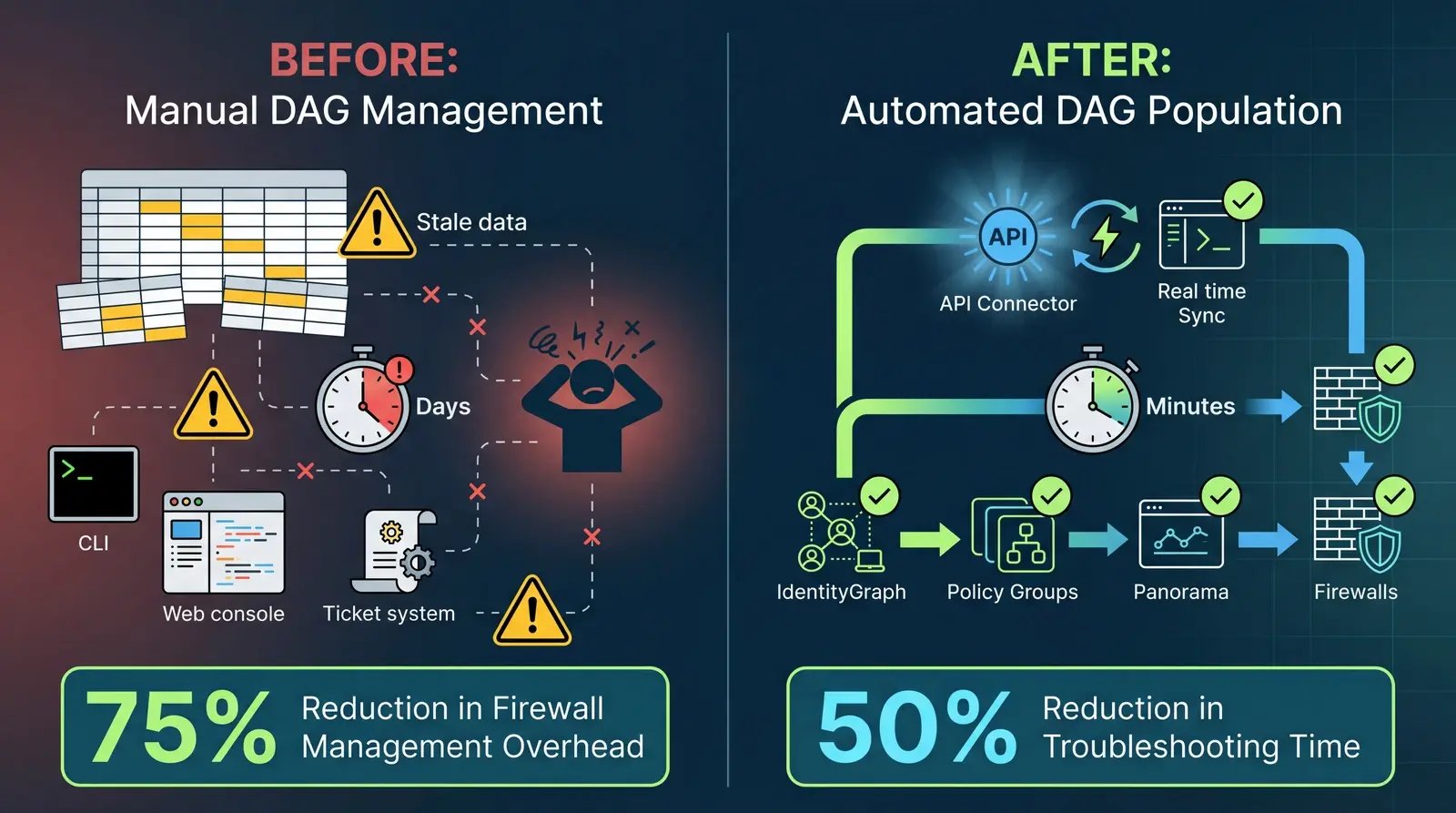
The operational impact of Palo Alto firewall automation is significant. One global industrial electronics manufacturer with 53 facilities reported a 75% reduction in firewall management overhead and a 50% reduction in troubleshooting time after automating their segmentation workflow (Elisity ROI Case Study Data). A global biopharma company reduced their total segmentation project investment from $200M to $50M, largely by eliminating the manual processes that the original firewall-based plan required (Elisity ROI Case Study Data).
Those numbers aren't about replacing firewalls. Both organizations kept their PAN deployments. The savings came from automating the classification and group management work that was consuming their teams.
Considerations and Limitations
No approach is without tradeoffs, and I think it's worth being direct about these:
- Existing PAN investment required: This workflow automates DAG management for Palo Alto Networks firewalls you already own. It's not a standalone segmentation solution. You need the firewalls in place to enforce the policies.
- Identity quality depends on sources: The accuracy of automated DAG population is only as good as the identity sources feeding it. Organizations with mature CMDB practices, deployed OT security tools, and consistent EDR coverage will see the best results. If your identity sources are sparse, the classification will be less precise.
- Transition period: Moving from manual to automated DAG management requires a validation period. Most organizations run automated DAGs alongside their existing manual groups for several weeks, comparing the outputs before cutting over. This is a responsible approach, not a limitation.
- Policy design still matters: Automating DAG population doesn't fix poorly designed security policies. If your inter-DAG rules are overly permissive or poorly structured, automated group management will faithfully enforce those same flawed policies faster. The automation removes the data entry burden, not the need for thoughtful security architecture.
The Future of Firewall Policy Management
The direction is clear: Palo Alto firewall automation and policy management more broadly are moving from static, manually maintained rule sets toward identity-driven, continuously adaptive enforcement. This isn't a prediction. It's already happening in organizations that have hit the scaling wall with manual processes.
Palo Alto Networks' own investments in IoT Security and AI-driven policy optimization reflect this trajectory. The industry is converging on the idea that security policies should be defined by what a device is and what it should be doing, not by which IP address it happens to have today.
For firewall administrators, this shift means your role evolves from maintaining address groups and chasing IP changes to designing and refining the security policies that protect your organization. That's a better use of your expertise, and frankly, it's a more defensible security posture.
If you're running Palo Alto Networks firewalls and spending more time maintaining DAGs than writing policies, the Palo Alto Networks and Elisity integration is worth evaluating. The firewalls you've already invested in become more effective when they're fed accurate, continuously updated device intelligence, and your team gets to focus on security strategy instead of spreadsheet management.
Frequently Asked Questions About Palo Alto Firewall Automation
What is a Dynamic Address Group (DAG) in Palo Alto Networks firewalls?
A Dynamic Address Group is a firewall object in Palo Alto Networks that groups IP addresses together based on tags rather than static definitions. Unlike static address groups where an administrator manually adds individual IPs or subnets, DAGs automatically include any IP address that matches specific tags registered to the firewall via the DAG API. This makes DAGs powerful for dynamic environments where devices frequently join, leave, or change IP addresses. Firewall administrators create security policies between DAGs, so when a device's tag updates, the policy enforcement follows automatically without requiring manual rule changes.
How does identity-based microsegmentation automate Palo Alto Networks firewall policies?
Identity-based microsegmentation automates PAN firewall policies by continuously discovering devices at the network edge, classifying them using multi-source identity attributes (device type, manufacturer, location, trust level), and pushing those classifications to Palo Alto Networks firewalls as Dynamic Address Groups via API. Instead of firewall administrators manually tracking which IPs belong in which address groups, an identity-based system maintains the mapping automatically. The firewall admin's role shifts from maintaining DAGs to designing security policies between them. The firewalls still enforce the rules. The automation handles the device-to-group classification that previously required manual effort.
What is the difference between Panorama integration and direct firewall integration for DAG automation?
Panorama integration pushes automated Dynamic Address Groups to your centralized Panorama management platform, where they cascade to all managed firewalls based on your existing device group and template stack configurations. This is ideal for large, multi-site environments where Panorama is already the central management console. Direct firewall integration pushes DAGs to individual Palo Alto Networks firewalls (NGFW or VM-Series) via their local API, giving you per-firewall control over which Policy Groups are published. Most organizations with established Panorama deployments start with Panorama integration and add direct integration for standalone or edge firewalls that operate independently.
How does automating Dynamic Address Groups reduce firewall rule bloat?
Firewall rule bloat occurs when address groups and rules accumulate over time without cleanup, with industry data showing 70-80% of enterprise firewall rules are outdated or redundant. Automated DAG management reduces bloat in two ways. First, it shifts policy enforcement from IP-specific rules to identity-based groups, which are inherently fewer and more stable than individual IP mappings. Second, because DAG membership updates continuously based on verified device identity, stale entries are automatically removed when devices leave the network or change classification. Organizations report up to 75% reduction in firewall management overhead when automating DAG population with identity-based classification (Elisity ROI Case Study Data).
Further Reading
- Palo Alto Networks and Elisity Integration: Firewall Automation
- The Hidden Costs of Firewall Complexity: Admin Burnout and Security Risks
- What Is Microsegmentation? The Essential Guide
- Modern vs. Legacy Microsegmentation: What Has Changed
- Elisity Platform Overview
About the Author
Charlie Treadwell is the Chief Marketing Officer at Elisity, where he leads go-to-market strategy for identity-based microsegmentation. With deep experience in cybersecurity marketing and network security, Charlie works closely with firewall administrators, security architects, and CISOs to communicate practical approaches to Zero Trust segmentation that complement existing infrastructure investments.
Share this
Get the latest on microsegmentation, Zero Trust, and network security delivered to your inbox.
No Comments Yet
Let us know what you think